When your accountant requests the CARO service, you as cardholder need to give your consent to share the credit card statements with the accountant. Thanks to Codabox, everything happens in a safe and structured way.
You will automatically receive an email from services@codabox.com, and if necessary 3 reminders.
If it concerns a KBC account, you'll receive instructions to activate the service via your banking application.
For other banks, you click the activation link in the email and follow a few short steps (more info below).
In this case, you'll need the following:
- The credit card statement (to check the client reference entered by the accountant when requesting the service).
- The credit card and bank card reader to be able to sign for activation of the CARO service (this is done via a transaction of €0).
How to activate CARO via the activation link? (not for KBC)
- Click the activation link in the mail.
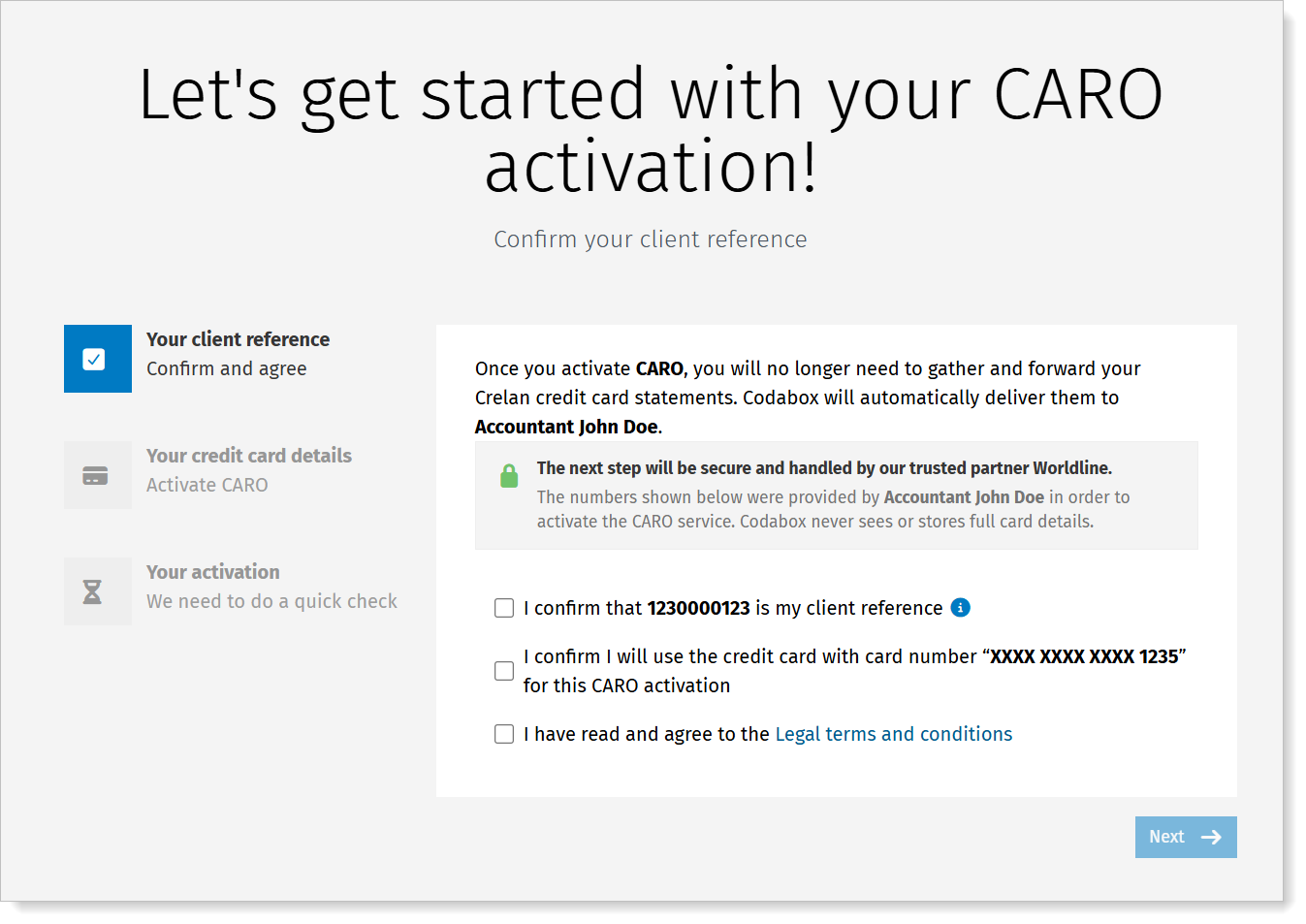
You'll see a welcome page. - Check the details thoroughly and confirm. Accept the legal terms and conditions, and click Next.
- Enter the credit card details. At the top of the screen, you'll see the last 4 digits of the card you need to use for this activation.
No costs are charged.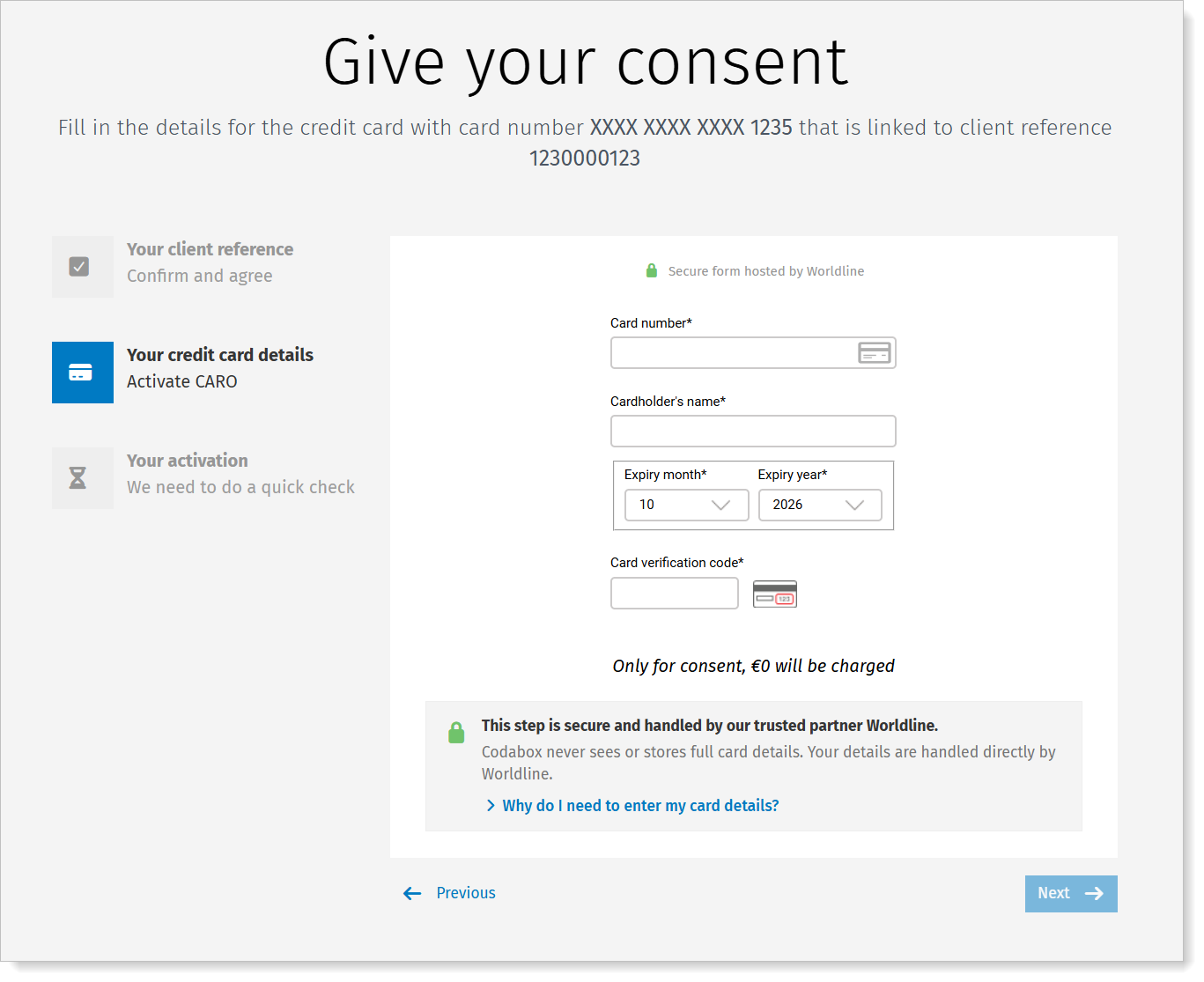
- The bank's secured portal opens: use your card reader and credit card to complete the CARO activation. The user experience is similar to an e-commerce transaction.
- The activation is verified and confirmed.
Troubleshooting for the cardholder |
Why is it not working?
➜ Did you get an error message? Read the message or share the info with your accountant.
➜ Start by checking the following:
| Check | Solution |
| Did you use the right card? | The activation screen shows the client reference and the last 4 digits of the card that needs to be used for this activation. Check on the statement whether the card number matches the client reference for which the accountant requested CARO. Retry the activation with the right card. |
| Did you enter the correct details? (card number, name, expiry date, verification code) | Check the details (on the card) and try again. |
| Is it a credit card? | CARO is not possible for debit cards. ➜ Does it say 'Debit' on the card? Then it is not a credit card. ➜ Does it say 'date of debit' on the statement? Then it is not a credit card. |
| Is it a new card that hasn't been used yet? | Activate the new card through a first transaction with PIN code: cash withdrawal, payment with PIN (not online) or PIN-change. If this doesn't work, it is probably an old or blocked card. Check with the bank. |
| Is the card no longer valid? | You probably already received a new card from the bank and must activate it through a first transaction with PIN code: cash withdrawal, payment with PIN (not online) or PIN-change. |
Is the card blocked by the bank or did you (temporarily) block the card via the app? | Check this. Unblocking can be done via the bank or via the banking app. Activating the card in the bank's systems may take a few minutes. If afterwards, the CARO activation doesn't work immediately, we recommend you wait and try again later. (For this consent, we require a transaction of €0) |
| Does the card not allow online transactions? | Check this and contact your bank. (For this consent, we require a transaction of €0) |
Note: the above troubleshooting does not apply to KBC/CBC accounts: check these instructions.
Is it still not working? Contact your accountant.