You can now request CODA files from the period prior to the activation of the mandate. This can be useful, for example, when adding an IBAN that has already been in use for some time.
There is no charge for these files.
Historical CODA is available for current accounts with active CODA via Argenta, Bank van Breda, Banque CPH, Belfius, Beobank, BNP Paribas Fortis, Crelan, Deutsche Bank, ING, KBC/CBC and Triodos.
The files are generated based on an open banking connection and are numbered with '000'. Check with your software to see if processing is possible and, if necessary, whether certain settings need to be adjusted.
Request, consent and delivery of historical CODA |
Via MyCodabox, you can easily request historical CODA per company, for the desired data/period.
The account holder receives an email to give one-time consent via the banking application. Following the consent, the files will be available immediately. You'll receive a notification in the white menu bar at the top.
Request historical CODA
- Find the company and open the CODA tab.
- At the top right, click the button Request historical CODA.
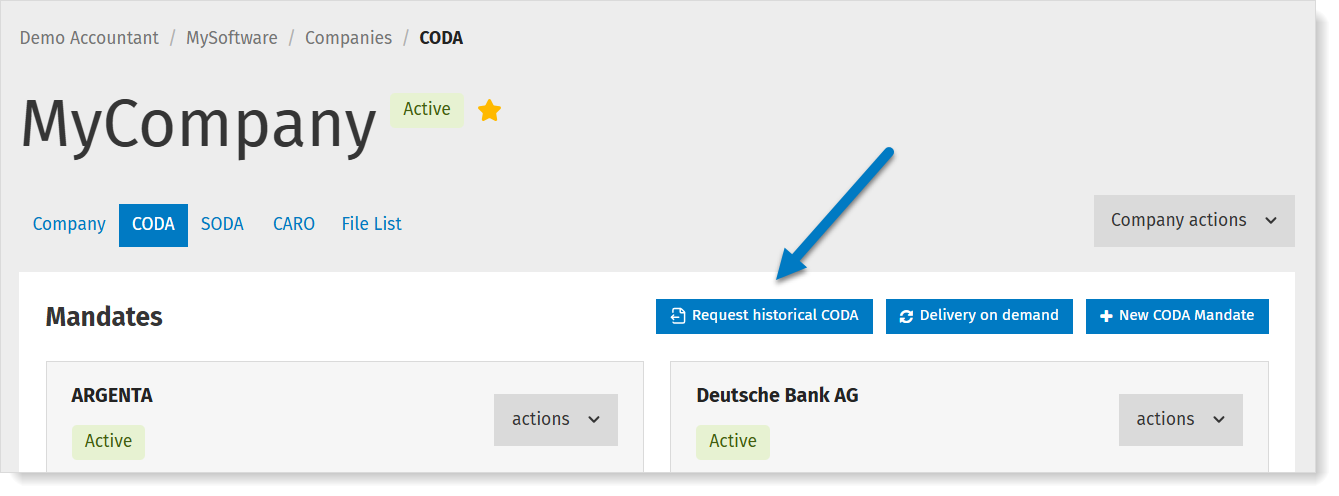
- On the next screen, select the current account(s) for which you want to retrieve CODA.
The screen indicates which accounts are eligible (more info about the conditions and status). - Click Continue.
- Specify the desired start date or select the entire period (all historical CODA that are available for this account). The available period depends on the bank and varies from 6 months to 2 years.
Click Submit request.
The account holder will receive a request to provide one-time authorization via the banking app (in addition to the mandate previously signed).
Consent by the account holder
Delivery of the files
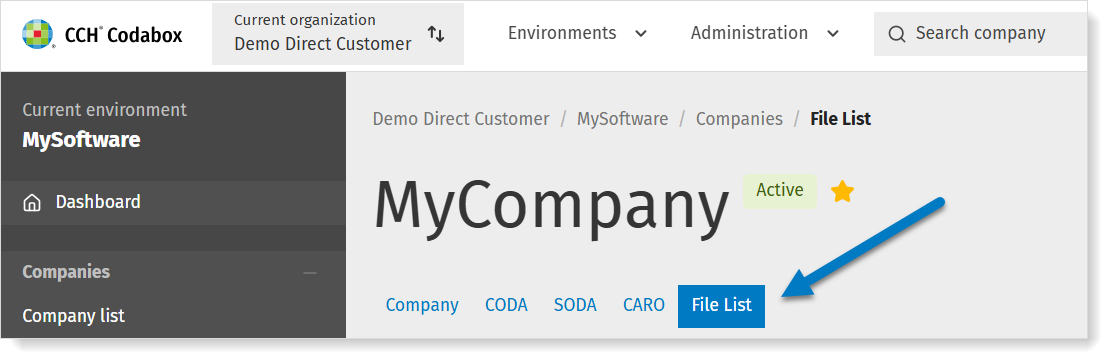
- Open the company in MyCodabox.
- Open the tab File List.
- Search for the CODA number '0' (this numbering is specific to historical CODA) or open the calendar to select the desired date or date range. The date you see is the statement date.
Tip: Files that were not previously delivered, are marked in the calendar with a light blue dot.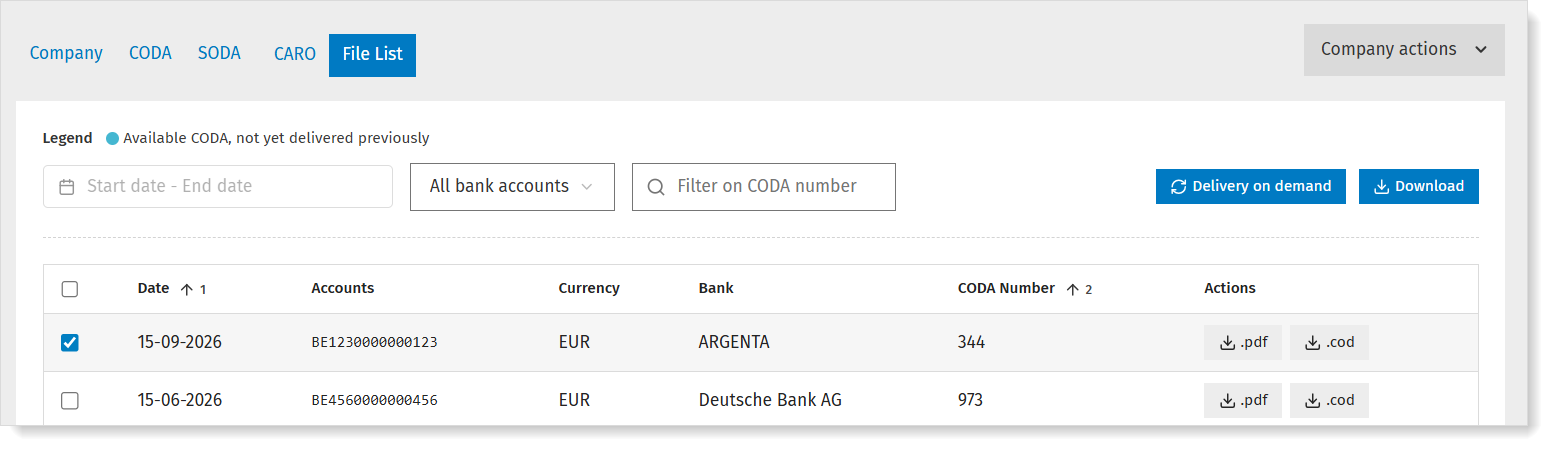
- You can instantly download one or more files, or use the button Delivery on demand to have them delivered via your daily delivery method. You will receive the files within 24 hours.
More info about the files |
We generate these files using an open banking connection. You may notice a difference compared to the CODA statements you receive daily.
We ensure that balances match and prefix all historical CODA statements with '000'.
Since banks use different numbering systems, and counting backward from the files already available is often not possible, we use this standard numbering to facilitate better integration with most softwares.
Check with your software provider to see if processing is possible and whether certain settings need to be adjusted.
Conditions and status |
Conditions and available period
Requesting historical CODA is possible if the following conditions are met:
- The IBAN is a current account (not possible for savings accounts)
- CODA is active for the IBAN
- The bank supports historical CODA. Currently: Argenta, Bank van Breda, Banque CPH, Belfius, Beobank, BNP Paribas Fortis, Crelan, Deutsche Bank, ING, KBC/CBC and Triodos.
The available period depends on the bank and varies from 6 months to 2 years (counting backward from the date the account holder gives consent):
- Argenta: 720 days
- Bank van Breda: 365 days
- Banque CPH: 90 days
- Belfius: 365 days
- Beobank: 182 days
- BNP Paribas Fortis: 180 days
- Crelan: 365 days
- Crelan (AXA): 365 days
- Deutsche Bank: 365 days
- ING: 365 days
- KBC/CBC: 389 days
- Triodos: 720 days
Status per company
For each company, you'll see the options and the status of the accounts in MyCodabox in the IBAN overview on the CODA tab. Move the cursor over the status to see the tooltip with more info.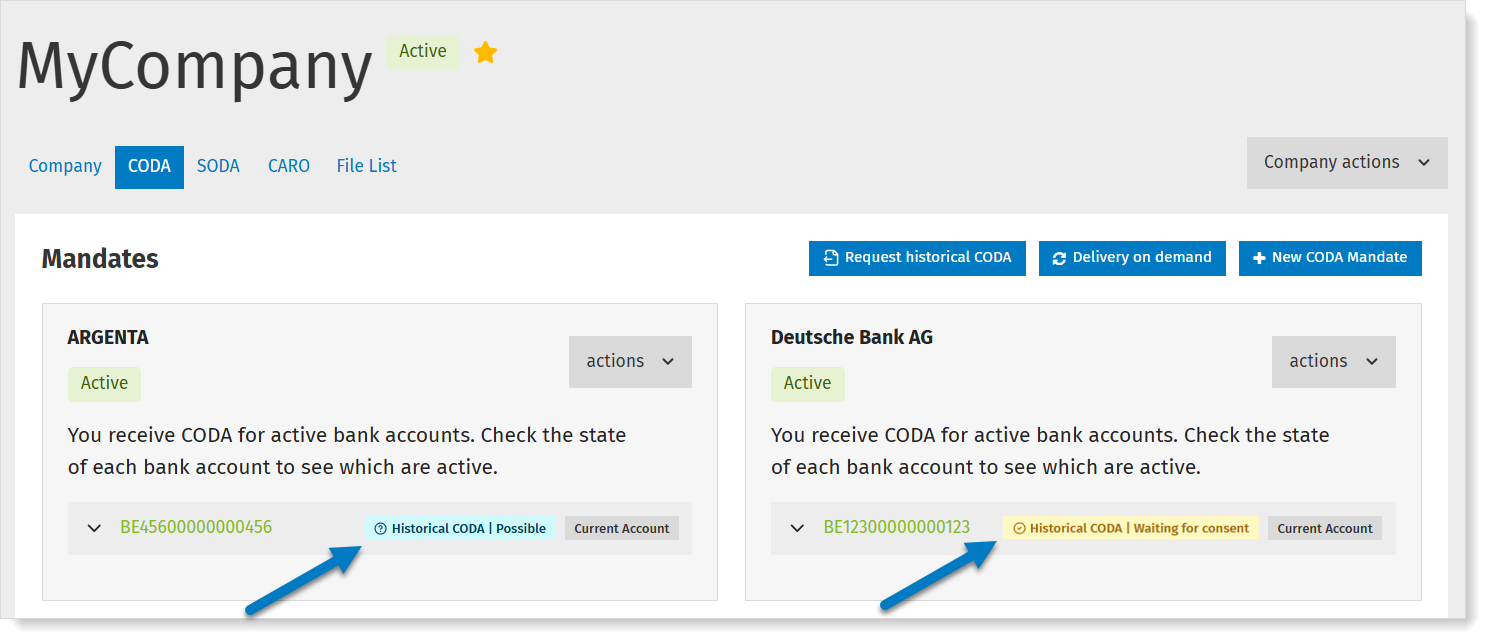
What does the status mean?
| Status | Meaning |
| Possible | You can request historical CODA statements. The available period depends on the bank (it is calculated retroactively from the date the account holder gives consent). Tip: via the File List, you can easily see for which dates CODA from the past are already available (since activation of the mandate). |
| Waiting for consent | The account holder received an email asking them to give one-time consent via the banking app. |
| CODA being created | The account holder has given consent. The files will be available for delivery within 1 hour. You'll receive a notification in the white menu bar at the top. |
| Ready for delivery | There are historical CODA files ready for delivery. There is a notification in the white menu bar at the top. ➜ Use the button Delivery on demand to get the desired files. |
| History delivered | The historical CODAs have been delivered or will soon be retrieved by your software. |
| Request expired | The request is no longer valid (after 30 days). ➜ Retry the request via MyCodabox and contact the account holder to give consent. |
| Request failed | The request did no go through. ➜ Check the account number and the email address and try again. |
| Not possible | Move your cursor over the status in on the CODA tab to see more info. The complete history is already available. Codabox has been delivering CODA for this account for so long that historical CODA does not apply. or Not possible for this bank. or It is a savings account. or CODA is not active for this account and/or there are no regular CODA files yet, which means there cannot be historical CODA. or There are no transactions on this account. Historical CODA does not apply. |
Overview: follow up on requests and delivery status
Go to Mandates & Services > CODA. At the top right, click the button Historical CODA.
You'll see an overview of the requests and their status.
If necessary, you can:
- cancel a request.
- copy the signature link and send it to the account holder (more info about account holder consent)
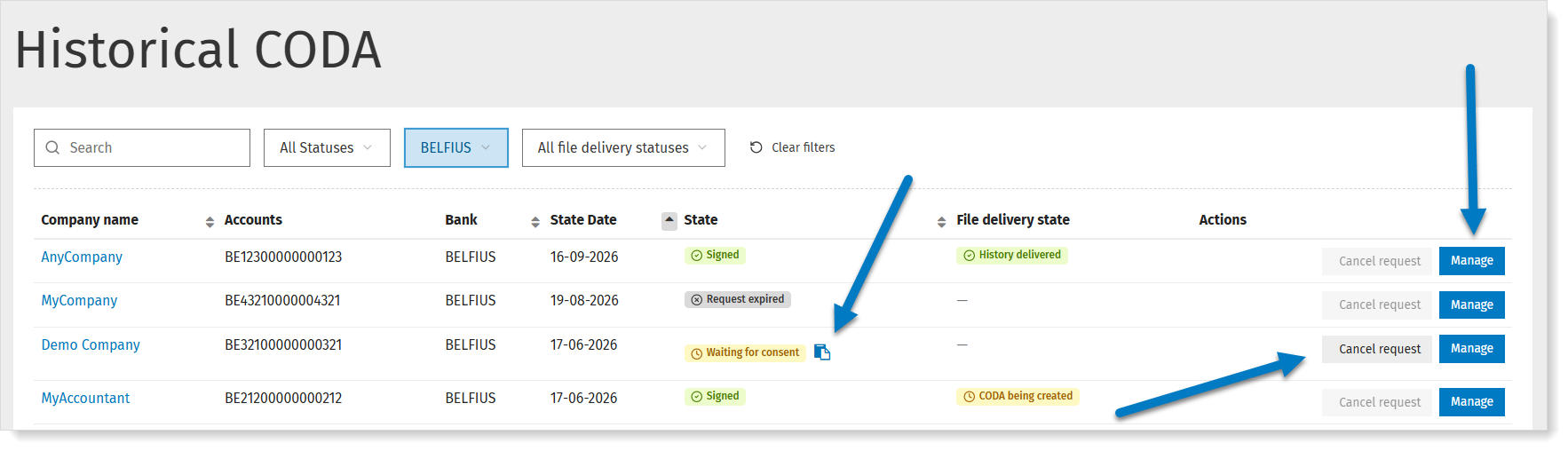
The most recent requests will appear first, but you can also sort according to your preference: on company name, date, state of the request or state of the delivery.
Troubleshooting |
When should I use the button 'Delivery on demand' and when should I use 'Request historical CODA'?
 | By default, we can redeliver the CODA that the bank has already generated since the start of the bank mandate (whether it’s a mandate under your management or through a previous accountant in case of a company transfer), with a limit of up to 2 years in the past. Via this button, you'll immediately see for which dates/period CODA files are available and you can immediately retrieve them. ★ If you have requested Historical CODA (see the button below) and the account holder gave consent, you'll also see the available dates for these additional files once you click Delivery on demand, and you can retrieve them (again) if needed. |
 | Thanks to an open banking connection we can in many cases retrieve the bank history from the period prior to the activation of the mandate. We create these files ourselves with matching balances and numbering '000'. You may notice a difference compared to the CODA you receive daily. The available period varies depending on the bank. Via this button, you can select the desired period per company. The account holder receives an email to give one time consent via the banking application. After that, you will automatically receive the files within 24 hours via your daily delivery method. ➜ Did you not receive everything or doesn't your software support the automatic delivery? You can use the button Delivery on demand or check the overview via the File list. |
What is the difference between the status 'History delivered' and 'Ready for delivery'?
History delivered | You have requested historical CODA for a certain period (files from before the activation of the mandate) and the account holder has given consent. There is a notification in the white menu bar at the top. ➜ The historical CODA have been delivered or will soon be retrieved by your software via the daily delivery method. |
Ready for delivery | You have requested historical CODA (files from before the activation of the mandate) and the account holder has given consent. The files are available, but were not delivered automatically via the daily delivery method. There is a notification in the white menu bar at the top. ➜ Use the button Delivery on demand to retrieve the desired files. Files that have not yet been delivered, are marked in the calendar with a light blue dot. |
More info about the different states.
Delivery: I still haven't received the files I need. What's wrong?
- Check the status for the IBAN in question:
- Is the status 'Ready for delivery'? Click Delivery on demand to retrieve the desired files.
- Is the status 'History delivered'? The files have been delivered or will soon be retrieved by your software. Check this in your software.
- Do the files you received not go far enough back in time? The available period for historical CODA depends on the bank (6 months to 2 years). Please note: the delivery period is calculated backward from the date the account holder gives consent (not from the date you submit the request, nor from the mandate’s activation date).
For example: you enter a request on January 1st 2026, for the entire period of 365 days. However, the account holder only gives consent on January 5th. This means the oldest file you will receive will be that of January 5th 2025. - Are there gaps in the period for which you received files? Via the button Delivery on demand you can check in the calendar for which dates files are available:
- Files that had not yet been delivered, are marked in the calendar with a light blue dot. You can retrieve these files immediately: the account holder does not need to give consent again.
- Do you see dates in the calendar that you cannot select? We cannot fill these gaps. Perhaps there were no transactions.
Delivery: I requested historical CODA from date X but only received from date Y. Why is that?
Consent: The account holder cannot select the IBAN in the banking portal
Is it the right IBAN? Ask the account holder to contact the bank.
Consent: How can I resend the email for consent to the account holder?
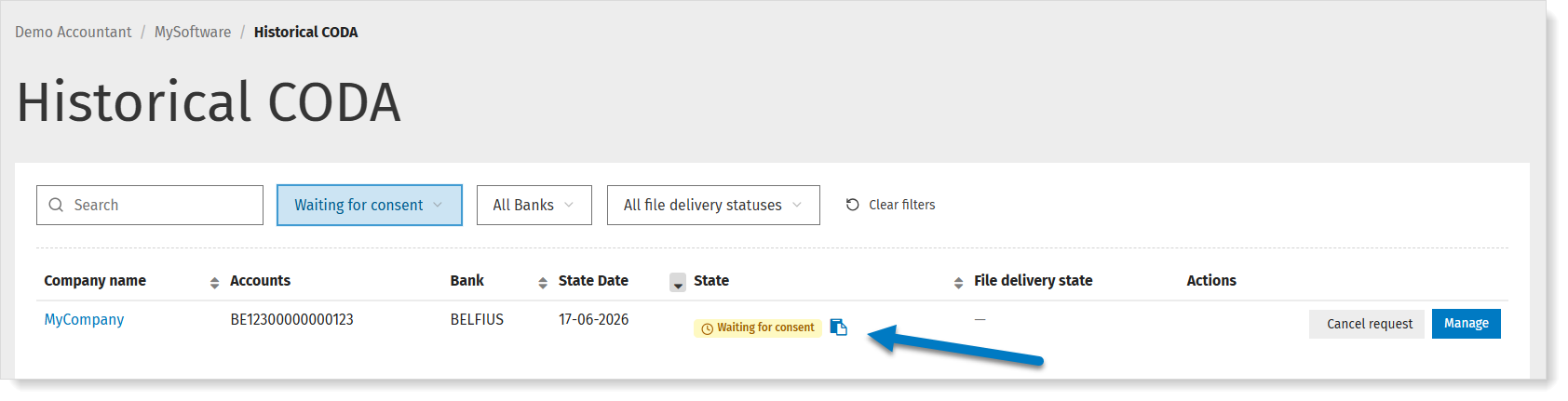
- Go to Mandates & Services > CODA.
- At the top right, click the button Historical CODA.
You'll see an overview of the requests and their status. - For the request in question, click the copy icon (copy signature link) and send the link to the account holder.
Consent: Can I change the email address for the request?
You'll see an overview of the requests and their status.
- Click Cancel request next to the account in question.
- Open the company and change the email address.
- Enter a new request.