You can now request CODA files from the period prior to the activation of the mandate. This can be useful when transferring a company from another office or when adding an IBAN (for an existing company) that has already been in use for some time.
There is no charge for these files.
Historical CODA is available for current accounts with active CODA via Argenta, Bank van Breda, Banque CPH, Belfius, Beobank, BNP Paribas Fortis, Crelan, Deutsche Bank, ING and Triodos, and soon also KBC/CBC.
The files are generated based on an open banking connection and are numbered with '000'. Check with your software to see if processing is possible and, if necessary, whether certain settings need to be adjusted.
Request, consent and delivery of historical CODA |
Via MyCodabox, you can easily request historical CODA per company. You can immediately choose the desired data/period.
The account holder receives an email to give one-time consent via the banking application. Following the consent, the files will be available immediately.
Request historical CODA
- Find the company and open the CODA tab.
- At the top right, click the button Request historical CODA.
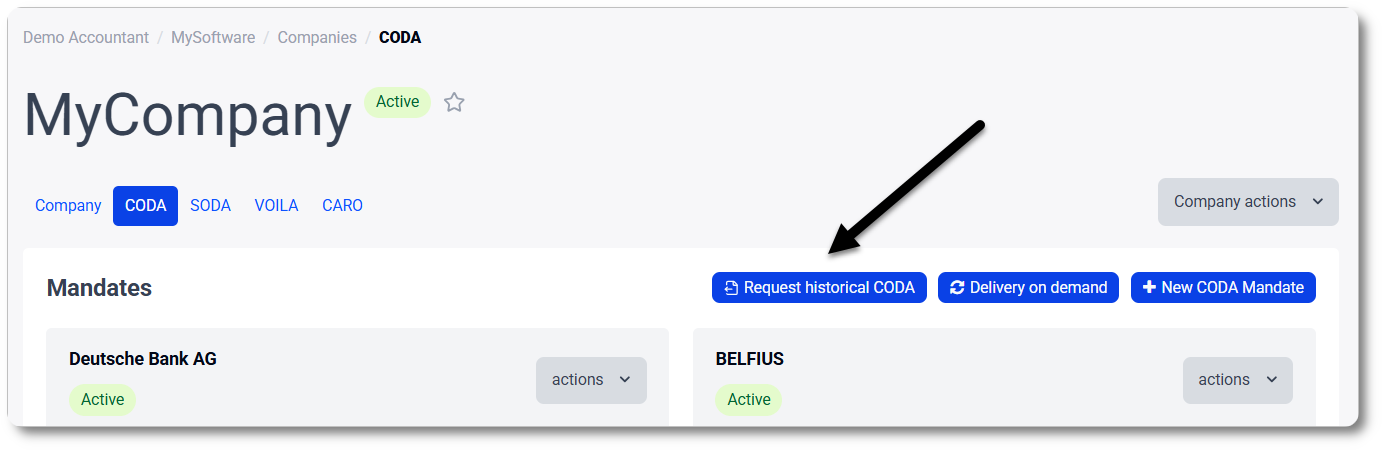
- On the next screen, select the current account(s) for which you want to retrieve CODA.
The screen indicates which accounts are eligible (more info about the conditions and status). - Click Continue.
- Specify the desired start date or select the entire period (all historical CODA that are available for this account). The available period depends on the bank and varies from 6 months to 2 years.
Click Submit request.
The account holder will receive a request to provide one-time authorization via the banking app (in addition to the mandate previously signed).
Consent by the account holder
- Go to Mandates & Services > CODA.
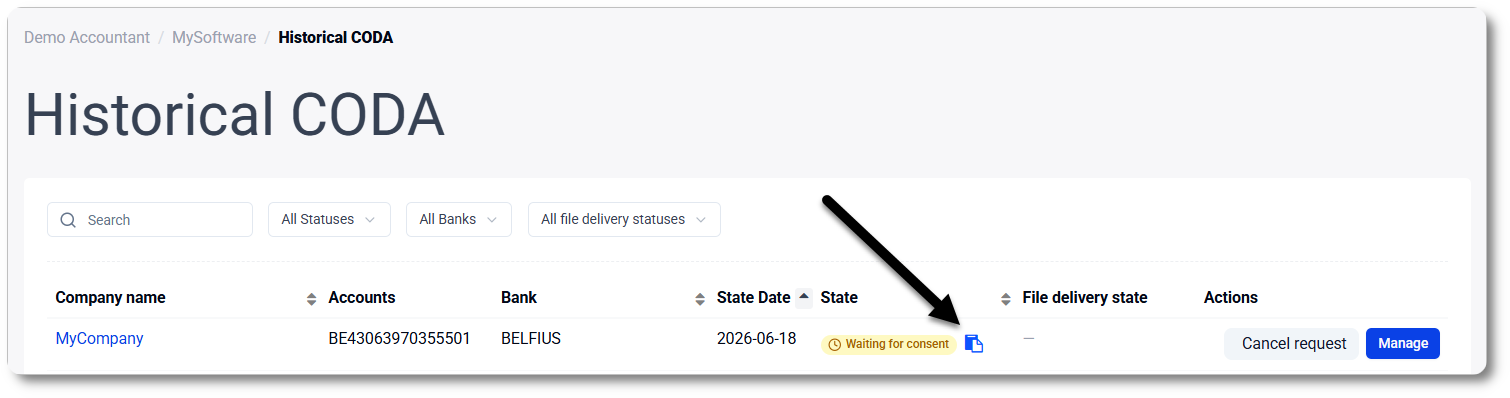
- At the top right, click the button Historical CODA.
You'll see an overview of the requests and their status. - For the request in question, click the copy icon (copy signature link) and send the link to the account holder.
Delivery of the files
- Go to Mandates & Services > CODA.
- Find the company in the list.
- Click the button Delivery on demand.

- Select the period for which you wish to receive the files.
The screen indicates the availability. Select the entire period or another date range within this period. Via the button Advanced you can also select a separate period per bank account or select ‘CODA number’ 000 to 000 (this numbering is specific to historical CODA).
Tip: The files that were not previously delivered, are indicated in the calendar with a colored dot. - Click Download CODA or Deliver CODA:
- Download CODA: You will immediately find the files on the download location that is configured via your browser.
- Deliver CODA: You will receive the files within 24 hours via your daily delivery method. You will immediately see how many files you will receive (per bank account).
More info about the files |
We generate these files using an open banking connection. You may notice a difference compared to the CODA statements you receive daily.
We ensure that balances match and prefix all historical CODA statements with '000'.
Since banks use different numbering systems, and counting backward from the files already available is often not possible, we use this standard numbering to facilitate better integration with most softwares.
Check with your software provider to see if processing is possible and whether certain settings need to be adjusted.
Conditions and status |
For each company, you'll see the status of the accounts in MyCodabox in the IBAN overview on the CODA tab.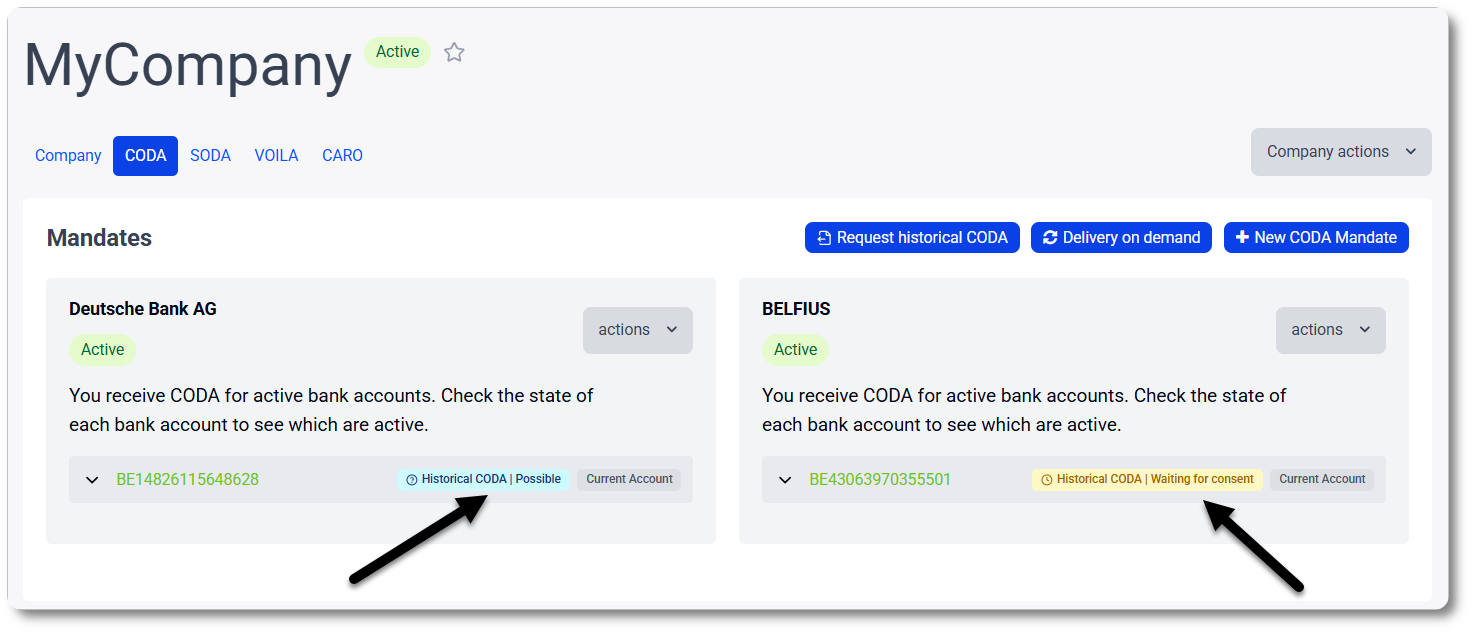
Conditions and available period
Requesting historical CODA is possible if the following conditions are met:
- The IBAN is a current account (not possible for savings accounts)
- CODA is active for the IBAN
- The bank supports historical CODA. Currently: Argenta, Bank van Breda, Banque CPH, Belfius, Beobank, BNP Paribas Fortis Crelan, Deutsche Bank, ING and Triodos, and soon also KBC/CBC.
The available period depends on the bank and varies from 6 months to 2 years (counting backward from the date the account holder gives consent):
- Argenta: 720 days
- Bank van Breda: 730 days
- Banque CPH: 90 days
- Belfius: 365 days
- Beobank: 365 days
- BNP Paribas Fortis: 180 days
- Crelan: 365 days
- Deutsche Bank: 365 days
- ING: 365 days
- Triodos: 720 days
What does the status mean?
| Status | Meaning |
| Possible | You can request historical CODA statements. The available period depends on the bank (it is calculated retroactively from the date the account holder gives consent). |
| Waiting for consent | The account holder received an email asking them to give one-time consent via the banking app. |
| CODA being created | The account holder has given consent. The files will be available for delivery within 1 hour. |
| Ready for delivery | There are historical CODA files ready for delivery. ➜ Use the button Delivery on demand to get the desired files. |
| History delivered | The historical CODAs have been delivered or will soon be retrieved by your software. |
| Request expired | The request is no longer valid (after 30 days). ➜ Retry the request via MyCodabox and contact the account holder to give consent. |
| Request failed | The request did no go through. ➜ Check the account number and the email address and try again. |
| Complete | Codabox has been delivering CODA for this account for so long that historical CODA does not apply. The complete history is available. ➜ Use the button Delivery on demand if you need to obtain any files from the past. |
| Not possible | Not possible for this bank or It is a savings account or CODA is not active for this account and/or there are no regular CODA files yet, which means there cannot be historical CODA. |
Overview: follow up on requests and delivery status
Go to Mandates & Services > CODA. At the top right, click the button Historical CODA.
You'll see an overview of the requests and their status.
If necessary, you can:
- cancel a request.
- copy the signature link and send it to the account holder (more info about account holder consent)
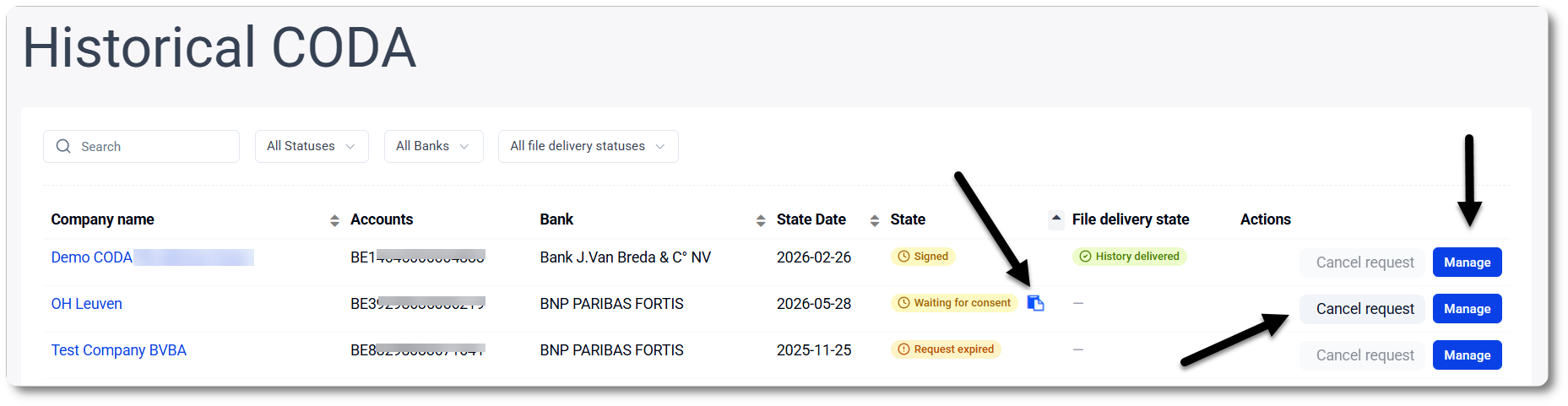
The most recent requests will appear first, but you can also sort according to your preference: on company name, date, state of the request or state of the delivery.