Credit card statements are published once a month (if there were transactions or a settlement for the credit) starting from the month following activation by the cardholder.
Delivery methods and file types |
Codabox delivers the PDF and XML file.
There are a number of options for delivery:
- Automatic delivery via the Codabox SyncTool on your server, in the folder COMPANYCODE/YEAR/CARO
- Integration via the Codabox Connect API (currently Yuki and Horus)
- Download via MyCodabox
If your accounting software cannot process the XML file, you can use the PDF file.
Which accounting softwares?
- Adsolut (Info in NL / Info in FR)
- BOB
- Expert/M (Info in NL)
- Horus
- Yuki (Info in NL / Info in FR)
Why can't the XML file be imported into all accounting software yet?
- Is your accounting software not compatible but your daily CODA files are delivered to your server?
➞ You will then also receive the CARO credit card statements in PDF format on the same location for each company, in the 'CARO' folder. - Is your accounting software not compatible and you have no delivery of CODA on your server?
➞ Download the PDF via MyCodabox! (see below)
Download CARO files via MyCodabox |
As soon as a credit card statement is available, you can download it via MyCodabox.
The CARO files remain available for download from MyCodabox for a period of 24 months.
- Go to MyCodabox > Mandates & Services > CARO > Find the company you wish to download the credit card statements for. Download is available for client references with the 'Active' status.
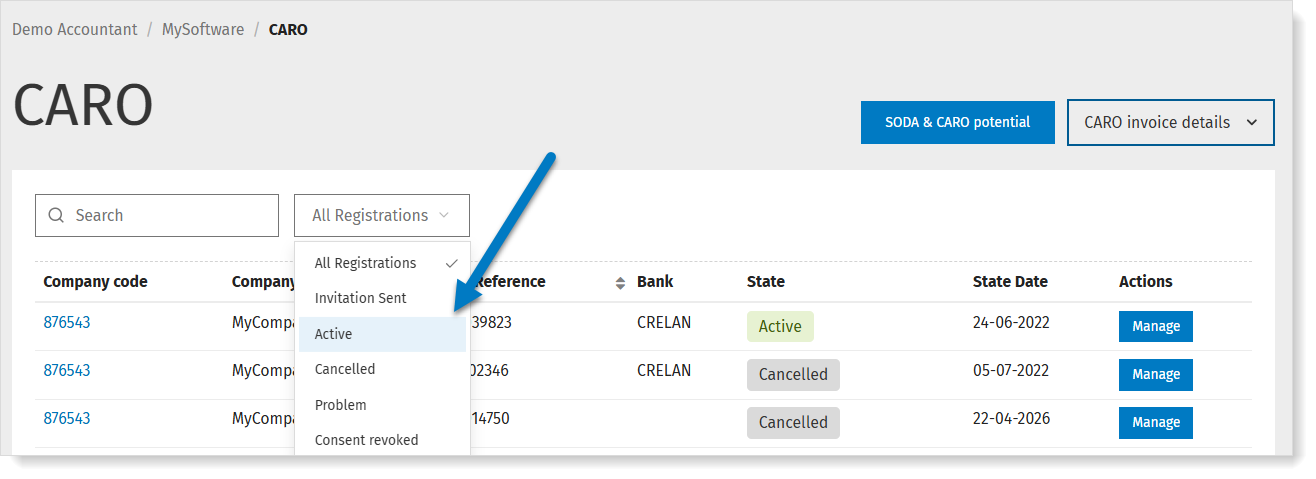
- Click Manage.
- In the next screen, click Download to get the available CARO files.

- Select the period and click Download.
The statements are downloaded in a .zip file with a name composed of CARO + the period you have chosen. For example: CARO - 202007.zip
Can I download CARO in the folder of my choice?
When you click Download, the statements are downloaded in the folder that is configured in your browser settings (Chrome, Edge, Firefox, ...).
➟ Check the documentation provided by your browser to change the download location.
Is an already downloaded CARO statement still available for further download?
Yes, the name of the downloaded .zip file is adapted in this case: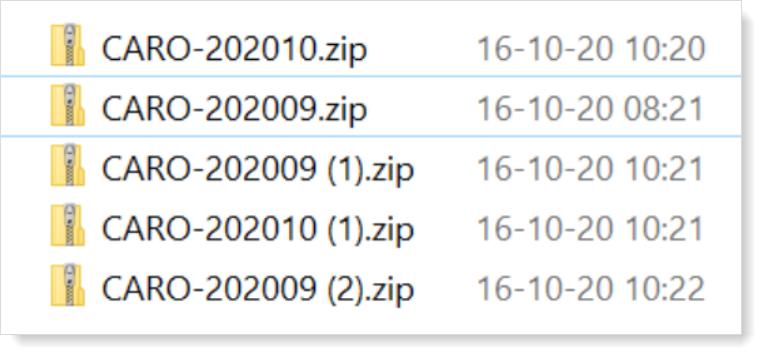
The credit card statements remain available on MyCodabox for a period of 24 months.
Frequently asked questions about delivery |
CARO has been activated, when and where will the statements be available?
WHEN?
Statements are delivered once a month (if there have been transactions or a settlement for the credit) starting from the month following activation by the cardholder.
The exact date depends on the credit card period of the bank: the date on which the periods are closed is different for each bank.
In MyCodabox, you can see for each bank on which day the statements are published:
- Go to MyCodabox > Mandates & Services > CARO. Find the company.
- Click Manage in the far right column to see the CARO requests for the company.
- Next to the name of the bank, you'll see an info icon that indicates on which day of the month this bank shares statements.
WHERE?
This depends on your delivery method:
- Via the Codabox SyncTool: the documents will be visible in the CARO folder for each company: COMPANYCODE/YEAR/CARO.
- Via the Codabox Connect API: the files will be automatically available in your software.
- Via MyCodabox: use the Download button in the CARO tab on the company details page.
CARO is active for my client but I don't receive their statements, what's going on?
- It is possible that your client did not use their credit card during the previous credit card period(s). In this case, Codabox will not receive credit card statements from the bank.
If there were no transactions in a particular month, but a settlement was done for the expenses of the preceding month, you will receive a statement for that settlement. This ensures that the balance is always correct.
If there were no transactions during two or more consecutive months, you will receive a CARO file after the first month, indicating the settlement and new balance. After the second month, you will no longer receive a CARO file because the balance has not changed. - Check the delivery method you're using for CARO. See above.