Once you request CARO via MyCodabox, the cardholder needs to complete the activation by giving consent.
The cardholder automatically receives an email from Codabox, and if necessary 3 times a reminder. You can also copy the activation link in MyCodabox and follow up on the status.
➜ Once the cardholder has given their consent, the credit card statements will be available as of the following month.
➜ More info on delivery can be found here.
CARO activation by the cardholder |
Inform your client in advance (+ template)
 Use our handy template email (
Codabox sends the cardholder an activation request and if necessary 3 reminders
- For KBC/CBC: instructions to activate CARO in the respective KBC/CBC apps
- For other banks: an activation link to activate the CARO service (see the steps below)
Steps to be taken by the cardholder
- The (professional) credit card details available on the credit card statements (to check the client reference entered by the accountant via MyCodabox).
- The credit card and bank card reader to be able to sign to activate the CARO service. The activation screens indicate which credit card to use.
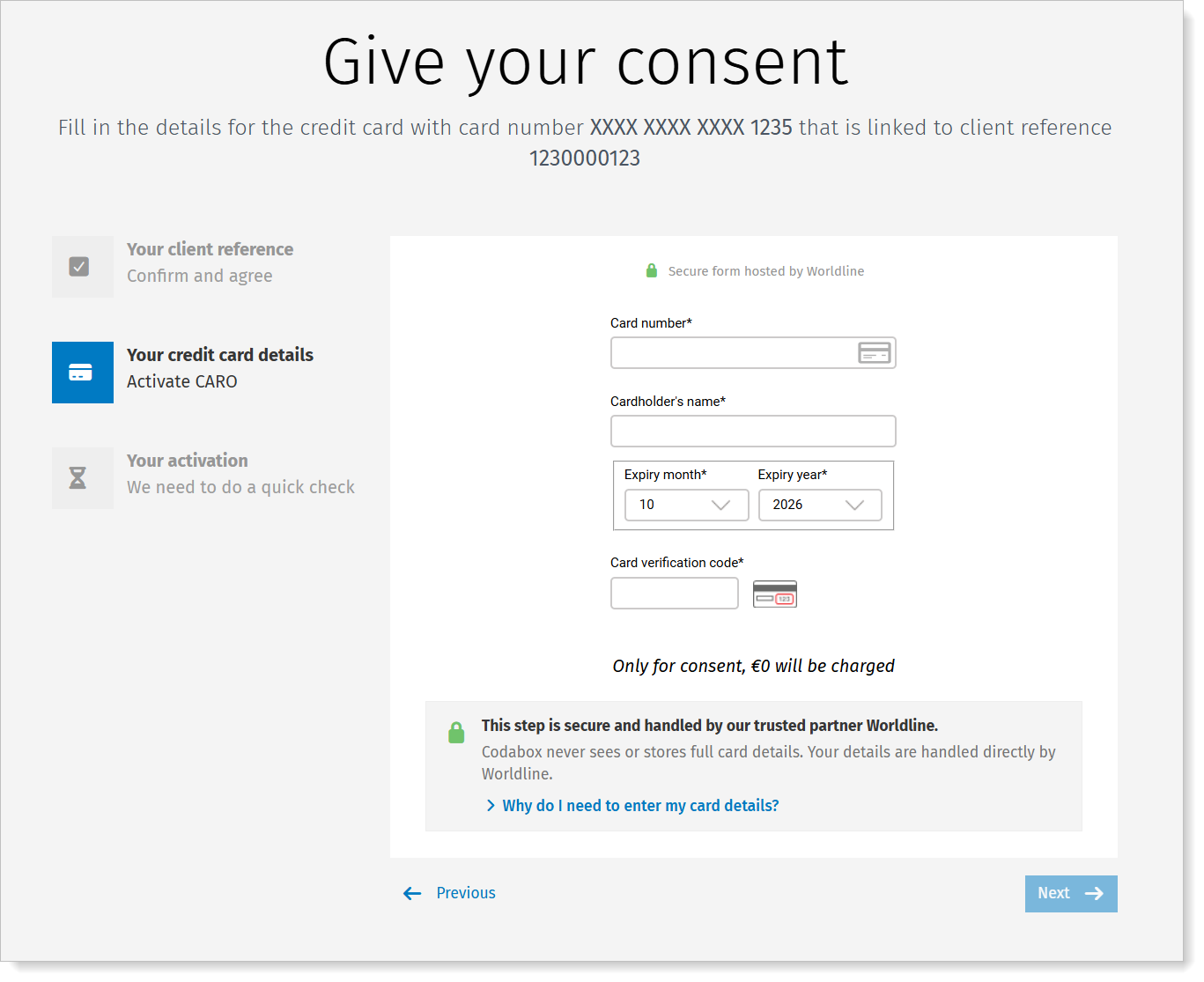
The cardholder will see more information on the screens about the trustworthiness of these steps. The data is securely processed and protected by our partner Worldline, in accordance with the highest security standards of the payment card industry. The card information is used solely to securely verify the card. No charge will be applied. The cardholder can also click through to our dedicated FAQ page for more information. |
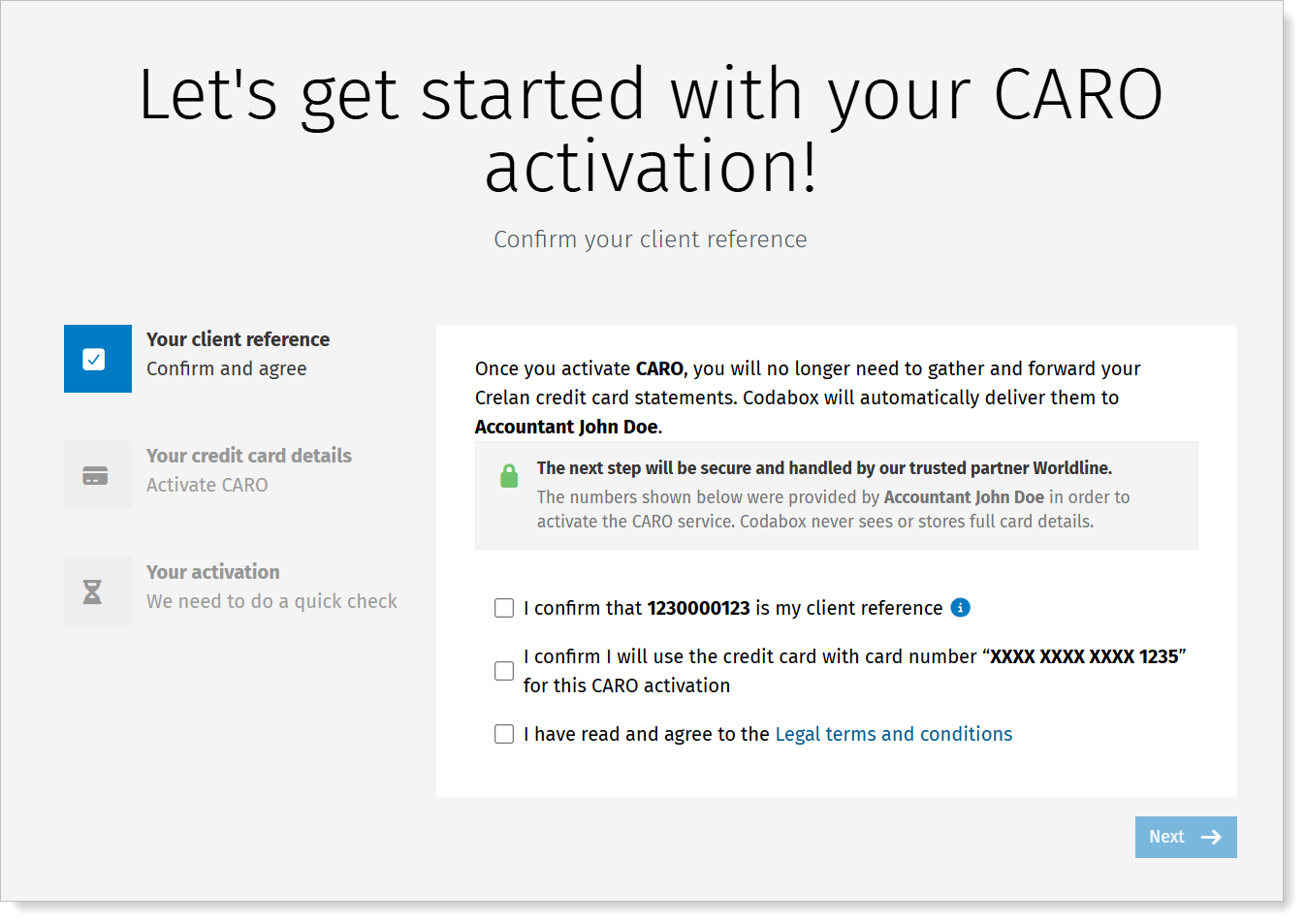
- The cardholder clicks the activation link and is redirected to a Welcome page. The cardholder confirms the details, reads the legal terms and conditions, accepts them if agreed, and clicks Next.
- On the next screen, the cardholder enters the credit card details. No costs are charged.
- The bank's secure portal opens where the cardholder will use the card reader and credit card to finalize the CARO activation. The user experience is similar to an e-commerce transaction.
- The activation is verified and confirmed.
➜ The credit card statements for this client reference will be available starting from the month following the activation.
Can the cardholder no longer find the activation link?
- Open the company's CARO tab.
For this client reference, the status is 'Invitation Sent'. - Copy the link and send it to your client, or start the activation together if the cardholder is at your office.

For KBC/CBC-customers, click How to activate. You'll see the page with instructions: you can email it yourself to the cardholder.  |
Troubleshooting for activation by cardholder |
Has the cardholder reporter that activation is failing?
Ask the cardholder to check the following.
You can also check the status in MyCodabox (more info below).
| Check | Solution (more info below) |
| Was the right card used? | The activation screen shows the client reference and the last 4 digits of the card that needs to be used for this activation. Ask the cardholder to check on the statement whether the card number matches the client reference for which CARO was requested. Ask the cardholder to try the activation again with the right card. Note: If a mistake happened in the CARO request: cancel the request in MyCodabox and make a new request with the right combination. |
| Were the correct details entered? (card number, name, expiry date, verification code) | Ask the cardholder to check the details (on the card) and try again. |
| Is it a credit card? | CARO is not possible for debit cards. Ask the cardholder to check if the word 'Credit' is printed on the card. Note: does it say 'date of debit' on the statement? Then it is not a credit card! |
| Is it a new card that hasn't been used yet? | The cardholder must activate the new card through a first transaction with PIN code: cash withdrawal, payment with PIN (not online) or PIN-change. If this doesn't work, it is probably an old or blocked card. The cardholder can check with the bank. |
| Is the card no longer valid? | The consent can only be done with the right card that hasn't expired. The cardholder probably already received a new card from the bank and must activate it through a first transaction with PIN code: cash withdrawal, payment with PIN (not online) or PIN-change. |
Is the card blocked by the bank or did the cardholder (temporarily) block the card via the app? | For this consent, we require a transaction of €0. Ask the cardholder to check this. Unblocking can be done via the bank or via the banking app. |
| Does the card not allow online transactions? | For this consent, we require a transaction of €0. |
Note: the above troubleshooting does not apply to KBC/CBC accounts. See these instructions.
You see the status 'Problem' in MyCodabox: more info
- Open the company's CARO tab.
- Check the Status: next to the status you'll see more info.
In some cases, you can resolve the problem yourself. Here you'll find an overview of what may have gone wrong:
| Error notification | Solution |
| The card used is not linked to the client reference in your request. | Use a recent credit card statement to check the details of the request in MyCodabox:
➟ Ask the cardholder to retry the activation with the right card and the right card details. It is possible your client has multiple cards. Explain to the cardholder that the activation screen shows the last 4 digits of the card that needs to be used for this activation. |
| The bank has confirmed that this client reference is linked to a different IBAN. (only applies to KBC/CBC credit cards) | Use a recent credit card statement to check the details:
|
| The card used during authentication does not match the registered card number. | The cardholder entered the wrong card details or a typo for the consent, or used a different card during the authentication via the banking portal. ➟ Ask the cardholder to retry the activation with the right card and the right card details. The cardholder can use a recent credit card statement to check the details. Explain to the cardholder that the activation screen shows the last 4 digits of the card that needs to be used for this activation. |
| The credit card is issued by a bank that does not support CARO. | The cardholder used the wrong card for the consent. ➟ Ask the cardholder to retry the activation with the right card and the right card details. The cardholder can use a recent credit card statement to check the details. Explain to the cardholder that the activation screen shows the last 4 digits of the card that needs to be used for this activation. |
| Payment authentication failed. Try again with correct authentication details (PIN, ...) | The cardholder entered the wrong card details or a typo for the consent, or used the wrong card/PIN during the authentication via the banking portal. ➟ Ask the cardholder to retry the activation with the right card and the right authentication details. |
| Transaction refused by the bank. Contact the bank to resolve. | Perhaps the card is not yet or no longer active:
➟ Ask the cardholder to contact the bank. |
| Unknown error. Potentially, card holder used a debit card instead of a credit card. | ➟ Ask the cardholder to retry the activation with the right card and the right card details. CARO is only possible for credit cards, not for cards where 'debit' or 'debet' is indicated. Note: does it say 'date of debit' on the statement? Then it is not a credit card. |
| Unknown error. Contact Codabox Helpdesk. | ➟ We're happy to help. Contact helpdesk@codabox.com. |
| Technical issue. Codabox is investigating. | ➟ Try again later or contact helpdesk@codabox.com. |