What is SODA, how are the files delivered and what is the pricing? Read more about it here.
Request SODA via MyCodabox |
Easily request SODA for all relevant companies at once
In this example, there are currently 8 SODA mandates to activate (for 8 different companies):
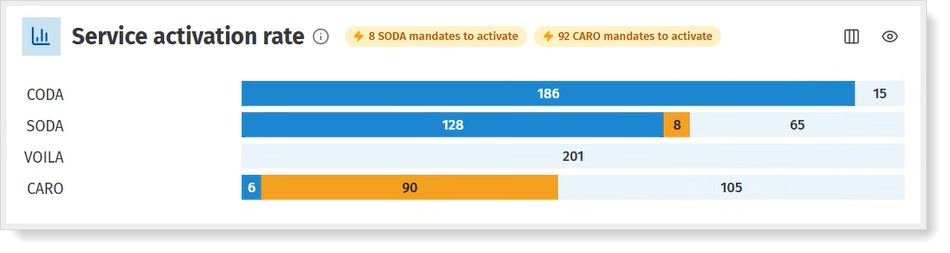
- Click the orange part of the bar or the yellow highlight at the top.
You'll see the overview of the companies, each with the social secretariat in question and in the right column the number of payments made in the last 12 months.

Click the button Order SODA for selection.
We will immediately send the requests to the social secretariats in question.
Would you like to download the SODA potential overview to share it with colleagues? Read more about it here.
Individually request SODA for each company
- Go to Companies > Company List: find the company for which you want to activate the SODA Service.
- In the rightmost column 'Actions', click New SODA Mandate.
- In the next screen, at the top right corner, click again New SODA Mandate.
- Select the applicable social secretariat from the list.
⇨ You can add several social secretariats using Add Social Secretariat. - Click Save Mandate.
Have a look at our short demo! (Click in the top right corner to enlarge)
Note: SODA can only be activated on condition that there is already a signed CODA mandate for the company, which includes permission for SODA.
Check the status via MyCodabox |
Check the status of the request
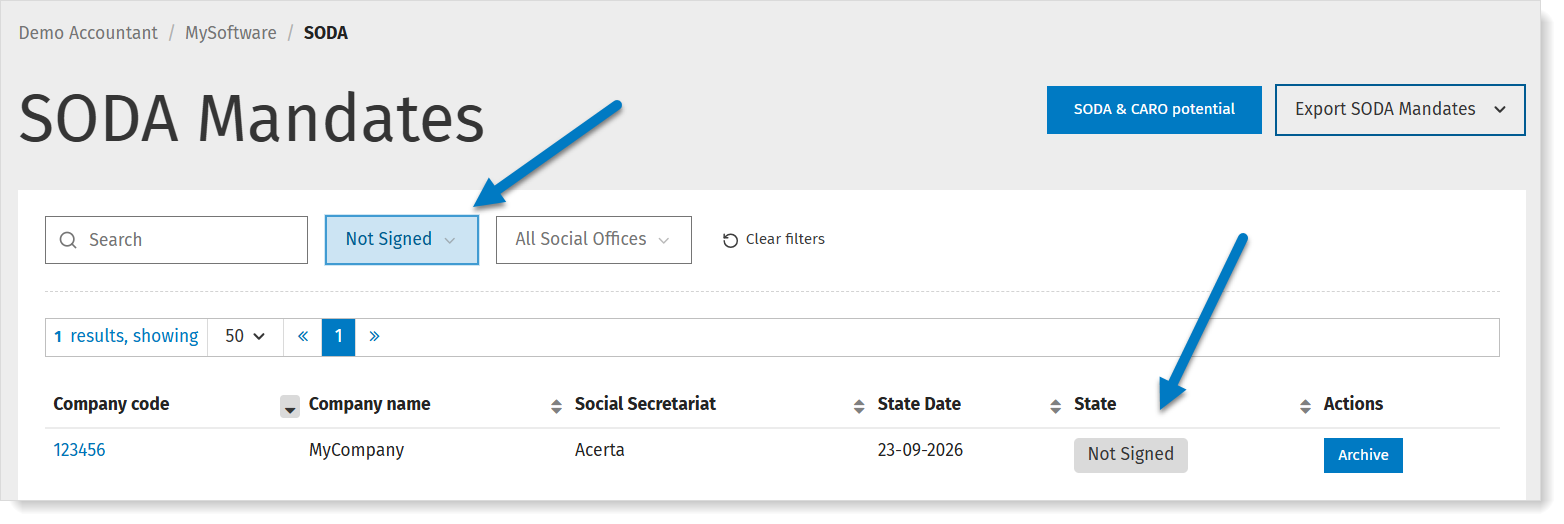
The different states and their meaning
| Mandate Status | Meaning |
| Not signed | The SODA mandate has been requested, but there is no signed CODA mandate yet for this company. |
| Signed | Mandate is signed. Codabox will soon request the SODA activation at the social secretariat. |
| Requested | The SODA activation has been requested at the social secretariat. |
| Delayed | The activation is delayed – Codabox sends a weekly reminder to the social secretariat. |
| Confirmed | The activation has been confirmed by the social secretariat – waiting for the first SODA file. |
| Active | The SODA mandate is active, Codabox receives SODA files from the social secretariat for this company. |
| Archived | The mandate was archived. See below. |
| Problem | Either Codabox could not process your request due to missing information, or the mandate was refused by the social secretariat. If you have not received any communication about this, please contact helpdesk@codabox.com |
Troubleshooting |
Why is the status of the request 'Archived'?
If you've entered a SODA request while the company is not yet known by this social secretariat, they will inform us of this. The status will change to 'Archived' in MyCodabox.
There are two ways to avoid this:
- Do your SODA requests based on the overview we offer with the number of mandates to be activated.
 We automatically show the companies that have made regular payments to a social secretariat in the last 12 months. From this overview, you can easily request SODA for all selected companies.
 - If you wish to request SODA individually for each company, make sure to check beforehand whether the company is already affiliated with the social secretariat.