Are some CODA files missing or are you not yet receiving CODA for a company?
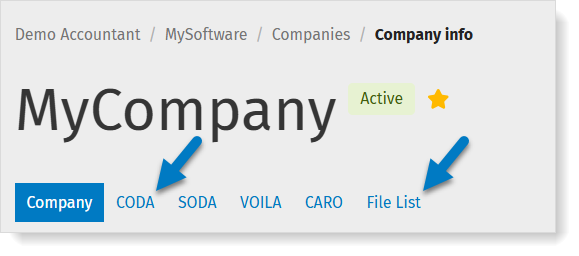
Find out via MyCodabox: check the status on the CODA tab and/or the File List.
A few quick checks you can do |
- Are you NO LONGER receiving CODA for an existing company?
➟ Check the status of the bank account in MyCodabox. If the status is 'CODA is provided', check with your client whether there were any transactions on the account since the last CODA was received.
Was CODA delivery temporarily INTERRUPTED?
You still receive CODA, but one or more intermediate files are missing.
➟ Check whether you can see the files in the File List on MyCodabox: there you’ll find a list of all available CODA files for all active accounts, per company.Found them? You can download the required files immediately or have them delivered to your software. Be sure to also check the synchronization settings in your software.
Can’t find them? Perhaps there were no transactions and therefore no CODA files, or the file has not (yet) been made available by the bank.
Are you NOT YET receiving CODA for a new IBAN/client?
You have requested CODA for a company but you don't receive the CODA yet. Perhaps the mandate hasn't been signed yet or hasn't been processed yet by the bank, or perhaps the account hasn't been activated yet by the bank.
➟ Check the CODA details via MyCodabox and check the status: more info about the mandate status and the bank account status.
Find more info about the delivery time below.- Is the mandate state 'Awaiting signature'?
Codabox has sent the necessary documents to the account holder, but we have not yet received the signed mandate.
➟ You can send the signing link to your client yourself. Follow these instructions.
More information in this video.
- Is the mandate state 'Awaiting signature'?
CODA delivery time / 'Active' status in MyCodabox |
My first CODA file: what is the delivery time?
What is the delivery time of the first CODA file from the moment I make the request?
- Once we receive your request, we send the bank mandates for signature to your clients (if Codabox manages the administrative steps of the mandates).
- Once these documents have been signed, they are sent by Codabox to the banks for validation of the signature and activation of CODA.
The activation time is highly variable from one bank to another. On average, you'll receive the first file within 48 hours.
Note: The procedure for activating Mandates for KBC/CBC accounts is different: KBC/CBC Mandate procedure.
When does the mandate status become active in MyCodabox?
|