Do you have specific questions about Historical CODA and the delivery? Check the answers below.
For more general info and instructions, you can check the page Historical CODA.
Files |
When should I use the button 'Delivery on demand' and when should I use 'Request historical CODA'?
Via the CODA tab, there are two ways to retrieve CODA from the past. Both are free of charge.
 | By default, we can redeliver the CODA that the bank has already generated since the start of the bank mandate (whether it’s a mandate under your management or through a previous accountant in case of a company transfer), with a limit of up to 2 years in the past. Via this button, you'll immediately see for which dates/period CODA files are available and you can immediately retrieve them. ★ If you have requested Historical CODA (see the button below) and your client gave consent, you'll also see the available dates for these additional files once you click Delivery on demand, and you can retrieve them (again) if needed. |
 | Thanks to an open banking connection we can in many cases retrieve the bank history from the period prior to the activation of the mandate. We create these files ourselves with matching balances and numbering '000'. You may notice a difference compared to the CODA you receive daily. The available period varies depending on the bank. Via this button, you can select the desired period per company. The account holder receives an email to give one time consent via the banking application. After that, you will automatically receive the files within 24 hours via your daily delivery method. ➜ Did you not receive everything or doesn't your software support the automatic delivery? You can use the button Delivery on demand or check the overview via the File list. |
What is the difference between the status 'History delivered' and 'Ready for delivery'?
Codabox shows a 'historical CODA' status for each account:
History delivered | You have requested historical CODA for a certain period (files from before the activation of the mandate) and the client has given consent. There is a notification in the white menu bar at the top. ➜ The historical CODA have been delivered or will soon be retrieved by your software via the daily delivery method. |
Ready for delivery | You have requested historical CODA (files from before the activation of the mandate) and the client has given consent. The files are available, but were not delivered automatically via the daily delivery method. There is a notification in the white menu bar at the top. ➜ Use the button Delivery on demand to retrieve the desired files. Files that have not yet been delivered, are marked in the calendar with a light blue dot. |
More info about the different states.
I still haven't received the files I need. What's wrong?
You have requested historical CODA and the client has given consent but you still haven't received all the files you wanted. Check the following:
- Check the status for the IBAN in question:
- Is the status 'Ready for delivery'? Click Delivery on demand to retrieve the desired files.
- Is the status 'History delivered'? The files have been delivered or will soon be retrieved by your software. Check this in your software.
- Open the tab File List for the company in question: you'll see a list of all available CODA files and you can also check the calendar.
Can you see the files you need? You can immediately download them or have them delivered to your software. - Do the files you received not go far enough back in time? The available period for historical CODA depends on the bank (6 months to 2 years). Please note: the delivery period is calculated backward from the date the account holder gives consent (not from the date you submit the request, nor from the mandate’s activation date).
For example: you enter a request on January 1st 2026, for the entire period of 365 days. However, your client only gives consent on January 5th. This means the oldest file you will receive will be that of January 5th 2025. - Are there gaps in the period for which you received files? Via the button Delivery on demand you can check in the calendar for which dates files are available:
- Files that had not yet been delivered, are marked in the calendar with a light blue dot. You can retrieve these files immediately: your client does not need to give consent again.
- Do you see dates in the calendar that you cannot select? We cannot fill these gaps. Perhaps there were no transactions.
I requested historical CODA from date X but only received from date Y. Why is that?
The available period for historical CODA depends on the bank (6 months to 2 years).
The start date that you see at the time of the request, can differ from the start date at the time of delivery. This is because the delivery period is calculated backward from the date the account holder gives consent (not from the date you submit the request, nor from the mandate’s activation date).
For example: you enter a request on January 1st 2026, for the entire period of 365 days. However, your client only gives consent on January 5th. This means the oldest file you will receive will be that of January 5th 2025.
➜ Did you request the wrong time period or a period that was too short? As soon as your client gave their consent, we made all files available, but the automatic delivery was limited to the specific time period you requested. Use the Delivery on demand button in the calendar to check if you can request any other files. Files that haven’t been delivered yet are marked with a light blue dot in the calendar. Your client doesn’t need to give consent again.
How can I process historical CODA files in WinAuditor?
All historical CODA files have '000' numbering. WinAuditor can't process files with '000' numbering.
➜ Download the desired files via the File list and then adjust the file numbers.
Consent |
My client cannot select the IBAN in the banking portal
Did you request historical CODA for the wrong IBAN? Enter a new request if needed.
Is it the right IBAN? Ask your client to contact the bank.
How can I resend the email for consent to my client?
Can your client no longer find the email from Codabox or do you wish to contact your client yourself?
- Go to Mandates & Services > CODA.
- At the top right, click the button Historical CODA.
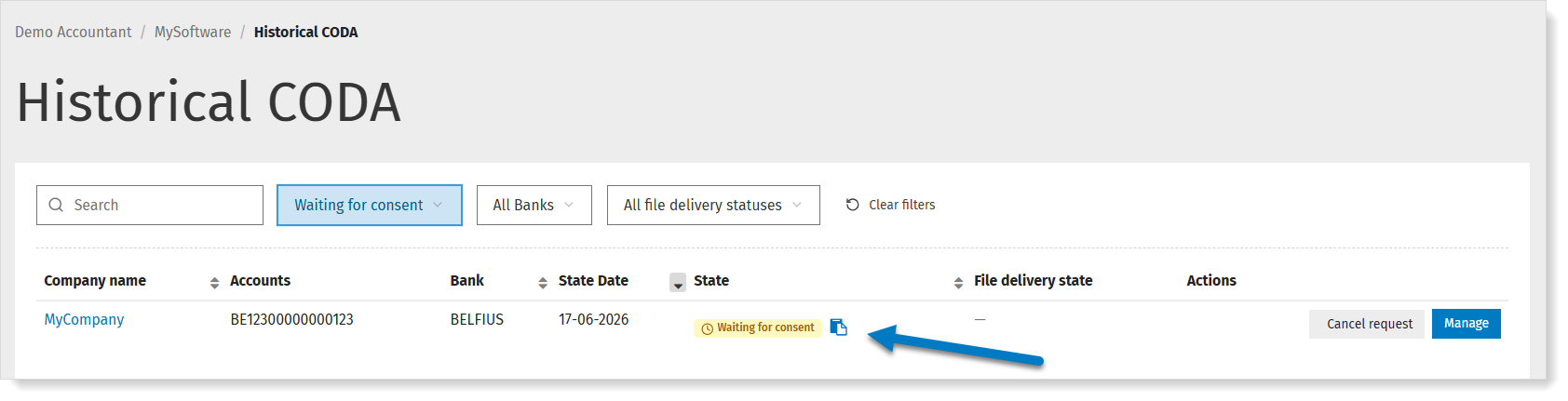
You'll see an overview of the requests and their status. - For the request in question, click the copy icon (copy signature link) and send the link to the account holder.
Can I change the email address for the request?
Go to Mandates & Services > CODA. Click the button Historical CODA at the top right.
You'll see an overview of the requests and their status.
You'll see an overview of the requests and their status.
- Click Cancel request next to the account in question.
- Open the company and change the email address.
- Enter a new request.
Why is my client asked to give consent to Spendee a.s.?
In order to create CODA files for the period prior to the banking mandate, we must comply with the European PSD2 legislation. This legislation stipulates that banks must grant access - after obtaining the account holder’s consent - to account information to authorized third parties. Spendee is one such authorized party and our trusted partner. This collaboration allows the account holder to safely grant consent via the familiar banking portal. The account information remains secure at all times: only Codabox has access to the transactions, and only for the purpose of creating the files. As always, Codabox guarantees maximum protection of both the personal data and the financial and accounting data we process.